
Live Session
Talking through a trade after the fact loses the moment. Live Session puts everyone on the same chart, in real time.
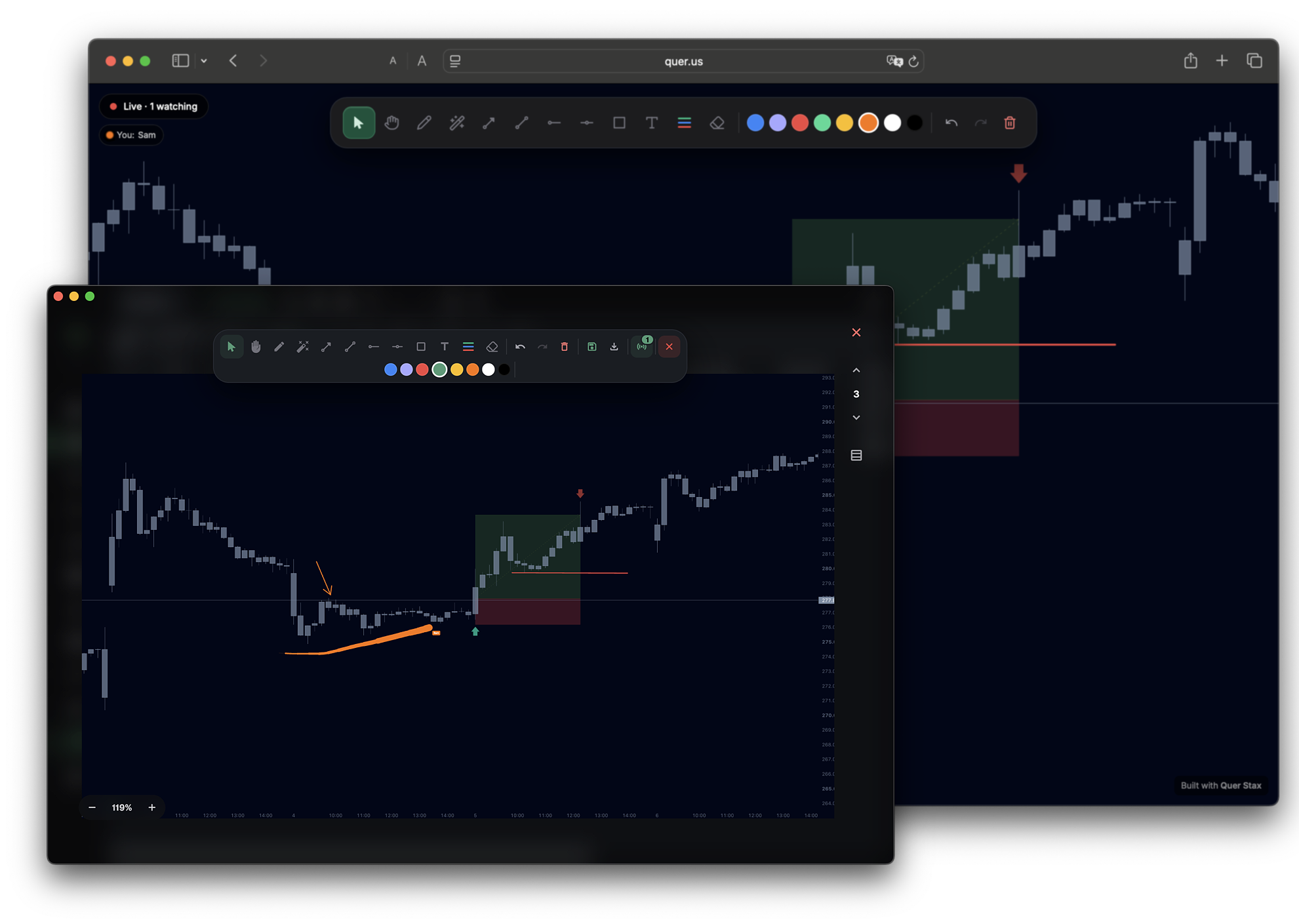
Most reviews happen in screenshots and replays — the moment is already gone. A Live Session is a real-time room. Pull up any of your trades, mark it up and share it live — close one, open the next, and a mentor or peer breaks them down with you in real time. The trade's screenshot streams in, a synced trade-data panel rides along, and anyone you send the link to can watch — no account required.
Share any trade, live
The host starts a session and Stax opens a real-time room and hands you a single share link to send.
Anyone with the link opens it in a browser to watch — no account required. A banner reads Live · N watching so you always know who is in the room. Live presence is tracked per viewer.
- Join from a link — open it in a browser, nothing to install
- One share link — send it and they're in
- No sign-up to watch — viewers join without an account
- Live · N watching banner shows the room in real time
Mark it up together, in real time
Reviewing a trade means pointing at the exact level that mattered. Live Session gives everyone a shared annotation toolbar over the same chart, so multiple people can draw at once.
The laser pointer leaves fading trails, so a mentor can sweep across the chart and everyone sees exactly where they are pointing as it happens.
And the markup isn't throwaway — when the session ends you can save the annotations and keep them, so the drawings stay on the trade for later review.
- Pencil
- Laser pointer with fading trails
- Arrow
- Trend line
- Horizontal ray
- Horizontal line
- Rectangle
- Text
- Eraser
- Adjustable weight and transparency on each tool
- Multi-peer annotation — more than one person can mark up the same chart
- Save the markup — keep the annotations after the session ends
The trade's numbers come with it
A chart without the setup is half the story. Push a trade screenshot into the session and it streams to everyone in the room.
A synced trade-data panel rides along beside the chart, so every viewer sees the same setup and the same numbers. Close one trade, open the next — the context follows the conversation.
- Screenshot streaming — the trade image shows up for everyone
- Synced trade-data panel — same setup, same numbers, for all viewers
- Close one, open the next — move through trades without losing the room
One-on-one reviews, group breakdowns, and team sessions all run in the same room. The host drives; everyone else watches and annotates.
Frequently asked
Do viewers need an account to watch?
No. Viewers open the share link in a browser — no account required.
How do people join a session?
The host starts the session and Stax produces a share link. Send it, and they open it in a browser to watch.
Can more than one person draw on the chart?
Yes. Multiple people can annotate the same chart at once, and the laser pointer leaves fading trails so everyone sees where you are pointing.
What drawing tools are there?
Pencil, laser pointer, arrow, trend line, horizontal ray, horizontal line, rectangle, text, and eraser — about twelve tools in all, each with adjustable weight and transparency.
Does the trade data follow along?
Yes. Push a trade screenshot into the session and a synced trade-data panel rides along, so everyone sees the same setup and the same numbers.
Can I keep the annotations?
Yes. When the session wraps, you can save the markup and it stays on the trade, so the drawings are there the next time you review it.
Break down your next trade, live
Start a session, share the link, and mark it up together. Free to start, local-first, on macOS and Windows.