
Mentoring
Coaching from a screenshot is guesswork. Mentoring gives a mentor read-only access to the real journal — and the trader decides what's in it.
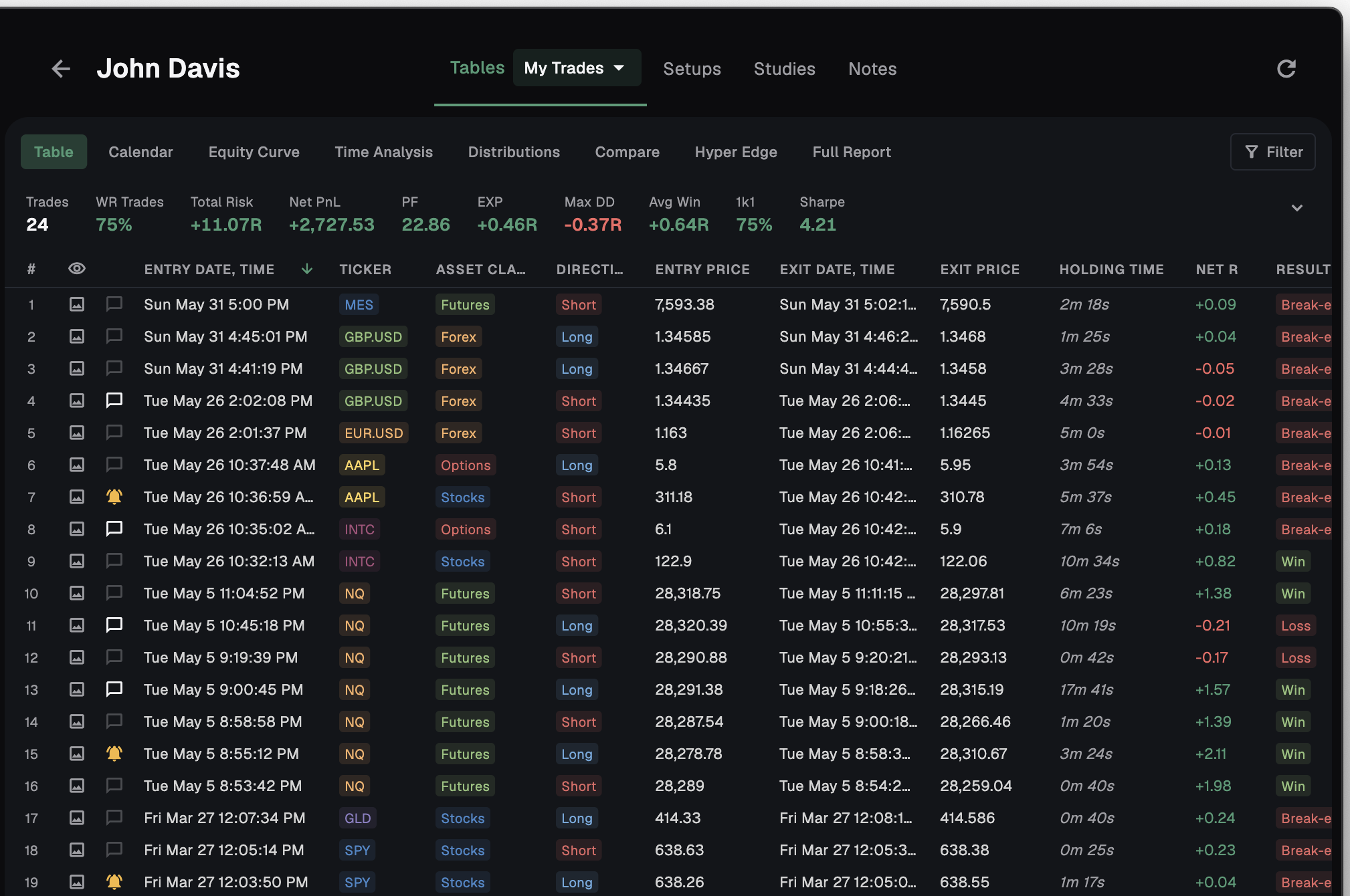
Mentoring is a two-sided coaching system built into the Stax sidebar. There are two roles: Mentor and Mentee. The mentor reviews a mentee's real journal read-only and comments on individual trades; the mentee chooses exactly what's shared. It also supports Team groups for companies and academies — with a Cohort Overview and a Mentor Leaderboard.
Coach on real trades, not screenshots
A mentor should see the work, not a cropped image of it. With Mentoring, the mentor gets read-only access to the mentee's actual journal.
The mentee detail opens with four tabs. Tables is the full read-only analytics — a metrics banner, filters, the trade table, and a full-screen trade-image viewer. Setups and Studies carry the rest of the work, and Notes holds auto-saving private mentor notes. The mentor can view and comment, but never edit.
- Tables — read-only metrics banner, filters, table, full-screen trade-image viewer
- Setups — the mentee's shared setups
- Studies — the mentee's studies
- Notes — auto-saving private mentor notes
- Read-only — mentors view and comment, never edit
Comment on the exact trade that matters
Generic feedback gets lost. Mentoring puts the coaching on the exact trade it belongs to.
Each trade has a Comments dialog — a flat chronological thread with author and timestamp. Both mentor and mentee can post, you can edit or delete your own, and unread comments are tracked. The field reads Write a comment..., and an empty thread shows No comments yet.
- Per-trade thread — comments live on the trade, not in a chat
- Author + timestamp on every comment
- Both sides post — mentor and mentee
- Edit or delete your own
- Unread tracking — see what is new
You choose what to share — the connection does the rest
Sharing a journal should never mean handing over everything. In Mentoring, you decide what goes across: a trade sheet, your setups, your research — you pick which ones to send.
What you send, you send in full. Share a sheet and the mentor sees that whole table, and while you stay connected your trades sync in real time. The control is the connection itself — the moment either side disconnects, the mentor's access to your trades ends completely. Connecting takes one code, not an email thread: each mentor has a single account-wide invite code. The mentee opens Connect with a Mentor, enters the code, and confirms — the accept dialog shows the mentor's profile and lists Connecting will share: your trade statistics, your trade screenshots, and your setups. Invites live under Pending Requests, Active, and Disconnected, with Accept, Reject, Disconnect, and Reconnect.
- You pick what to send — a trade sheet, setups, research
- Shared in full, in real time — a shared sheet syncs live while you're connected
- Disconnect ends access — part ways and the mentor can no longer see your trades
- One invite code — account-wide, no email back-and-forth
- Read-only — the mentor views and comments, never edits
The accept dialog spells it out before you confirm: your trade statistics, your trade screenshots, and your setups. The mentor can view and comment, never edit.
Run a trading room or academy
One mentor and one mentee is the start. Team mode runs a whole firm or academy, two ways.
With Oversight, your traders send their trades straight to the team — the same way a trader shares with a mentor — so the desk sees the whole cohort's results in one place. With Mentoring, mentors connect one-to-one with traders inside the team. Across both, a Cohort Overview rolls up Total R, average win rate and trades, with insight cards for Top Performer, Needs Attention, and Most Improved; and a Mentor Leaderboard ranks mentors by mentees, trades, win rate and total R.
- Oversight — traders send their trades to the team; the desk sees the whole cohort
- Mentoring — one-to-one mentor–trader connections inside the team
- Cohort Overview — Total R, average win rate, trades
- Mentor Leaderboard — ranks mentors across the cohort
- Collapsible groups and a Mine / Team toggle
| Capability | Mine | Team |
|---|---|---|
| Read-only mentee journal | Yes | Yes |
| Per-trade Comments | Yes | Yes |
| Oversight — traders send trades to the team | — | Yes |
| Cohort Overview | — | Yes |
| Mentor Leaderboard | — | Yes |
| Unlimited mentees and groups | — | Yes |
Frequently asked
Can a mentor change my trades?
No. Access is read-only. A mentor can view your journal and comment on trades, but never edit anything.
How do I connect with a mentor?
Each mentor has a single account-wide invite code. Open 'Connect with a Mentor', enter the code, and confirm. The accept dialog shows the mentor's profile and exactly what connecting will share.
Do I control what's shared?
Yes — you choose which trade sheet, setups and research to send. Whatever you share goes in full and syncs in real time while you're connected, and the moment either side disconnects the mentor can no longer see your trades. There's no per-trade hiding; the control is the connection itself.
Where does feedback live?
On the trade. Each trade has a Comments thread with author and timestamp. Both mentor and mentee can post, edit or delete their own, and unread comments are tracked.
Is there a mode for firms and academies?
Yes. Team mode gives a firm or academy two ways to work — Oversight, where traders send their trades to the team, and Mentoring, with one-to-one mentor connections — plus a Cohort Overview, a Mentor Leaderboard, and unlimited mentees and groups.
Is Mentoring free?
Mentoring is a paid capability. The Free plan shows upgrade cards for the Trader plan and the Mentor plan; Team accounts unlock the Team view, unlimited mentees, and groups.
Coach on the real journal
Connect with one code, review read-only, and comment on the exact trade. Team mode runs the whole cohort. Free to start on macOS and Windows.