
Prop Calculator
Most prop calculators size a single position. This one replays your whole history against the firm's rules and tells you if you would have passed.
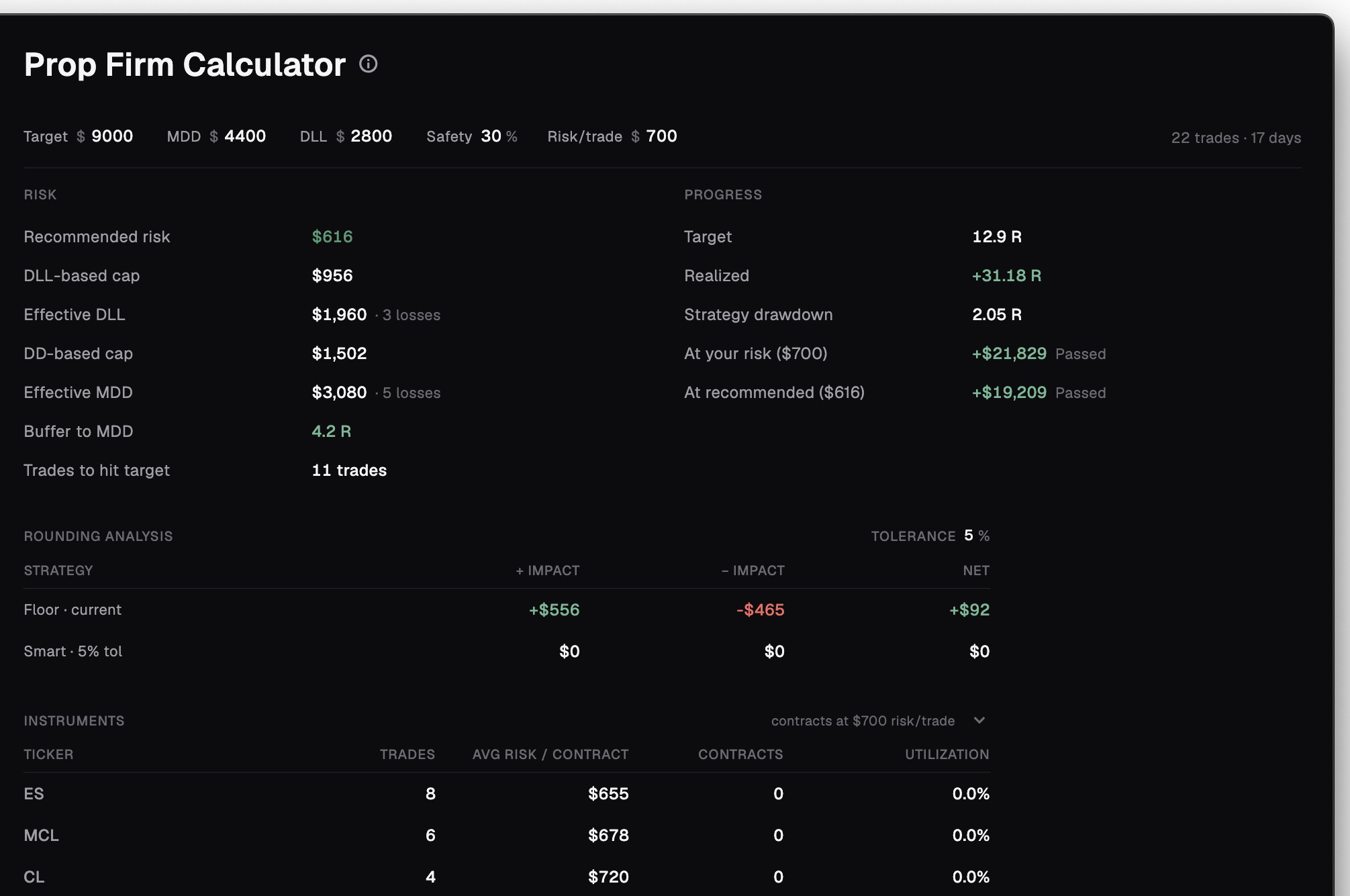
A prop challenge is a math problem before it is a trading problem. The Prop Calculator solves it with your own numbers — it replays every trade that carries a Net R value against the rules you type in, then tells you the exact risk per trade that survives and whether your strategy would have passed. Everything runs on fee-inclusive Net R from real trades. This is grounded planning math, not a backtest and not a prediction.
It plans the challenge from your own history
Type the rules, and the calculator replays the trades you already took against them. It is firm-agnostic — you set the constraints, so it works for any challenge.
You drive it from one editable strip. Five inputs, plus a meta line showing how much history is in play.
- Target ($) — the profit you need to clear
- MDD ($) — the maximum drawdown limit
- DLL ($) — the daily loss limit
- Safety (%) — how much headroom to keep off each ceiling
- Risk/trade ($) — the risk you intend to take
Every figure comes from your real, fee-inclusive Net R trades. This is not a backtest, not an AI prediction, and not a trading signal — it is planning math built from your own history.
The exact risk per trade that survives the rules
The recommended risk per trade is the largest you can take while still respecting every limit at once — so the tightest rule is the one it plans around.
Your Safety % keeps it a step back from every limit, so you plan with headroom instead of sitting on the line.
- Respects your max-drawdown limit
- Respects your daily-loss limit
- Survives your modelled worst loss streak
| Output | What it tells you |
|---|---|
| Recommended risk/trade | The largest risk that respects all three limits, with your Safety % headroom |
| Buffer | Room left to the max-drawdown limit, in R |
| Trades to target | How many trades are needed to reach the target |
Would you have passed?
The PROGRESS section restates the target in R, sets your realised R against it, and shows your strategy's drawdown.
It projects P&L two ways — at your risk and at the recommended risk — so you can see what changing your sizing would do.
A status badge sums it up at a glance.
Stress-test the bad streaks
Passing on average is not the same as surviving a bad run. From your win rate, the calculator works out your likely worst loss streaks — a 95% and a 99% figure — and how often a streak that size should occur.
It then shows how much of your max drawdown such a streak would eat, in dollars and as a percentage, so you size for the bad day, not the good one.
For US futures, two extra sections sharpen the plan. Rounding Analysis compares Floor against Smart contract sizing and the P&L impact of each. Instruments breaks the history down per ticker.
| Column | What it shows |
|---|---|
| Trades | Count per ticker |
| Avg risk per contract | Typical risk carried, per contract |
| Contracts | Contracts sized for the plan |
| Utilization % | Share of risk on this ticker — flagged when concentration is high |
Frequently asked
Is this a position size or lot calculator?
No. It does not size a single position from entry and stop. It replays your real trade history against a challenge's rules to find the risk per trade that survives and whether your strategy would have passed.
Which trades does it use?
Every trade that carries a Net R value. Add a Net R column in the Trades tab and the calculator can forecast the drawdown, recommended risk, and likelihood of passing.
Does it work for a specific prop firm?
It is firm-agnostic. You type the rules — target, max drawdown, daily loss limit — so it models any challenge.
Gross or net?
Net. Every figure runs on fee-inclusive Net R from your real trades.
I have no trades yet. What do I see?
An empty state: add trades in the Trades tab to use the Prop Calculator. It needs your history to model anything.
Model your next challenge from real trades
The Prop Calculator is a paid feature in Quer Stax. Free to start, local-first, on macOS and Windows.