
Setups
A setup is more than a name you tag on a trade. In Stax it is a playbook with rules and screenshots, a scoreboard of its own, and per-condition analytics that prove which conditions actually move your edge.
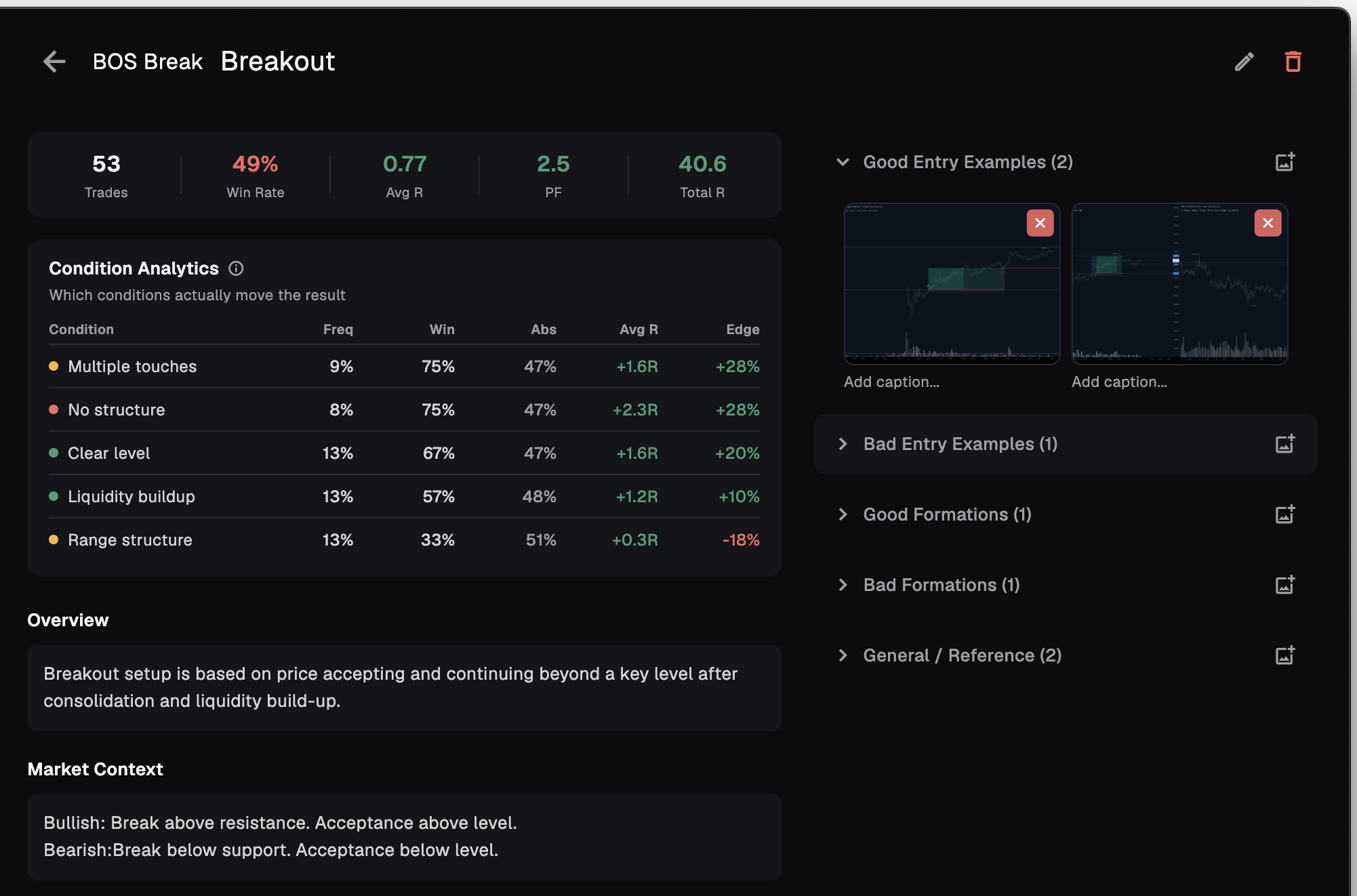
Most journals treat a setup as a tag. Stax treats it as a playbook — rules, examples, and conditions you can actually measure. Tag a trade with the Setup dropdown and that setup aggregates its performance for you.
Playbooks, not sticky notes
Each setup has an identifier (a short code), a name, and a description, then four rich-text sections you write once and reuse: Overview, Market Context, Entry Rules, and Exit / Management.
Conditions sit in three colored groups — Must have, Good conditions, and Avoid conditions — added and removed inline, saved automatically. Screenshots organise into five categories: Good Entry Examples, Bad Entry Examples, Good Formations, Bad Formations, and General / Reference. Open any one in a full-screen viewer and annotate directly on the image.
- Four sections — Overview, Market Context, Entry Rules, Exit / Management
- Three condition groups — Must have, Good, Avoid, with auto-save
- Five image categories — good and bad entries, good and bad formations, reference
- Annotate on the image — mark up examples in a full-screen viewer
Every setup keeps its own scoreboard
Tag trades with a setup and a green/red stats banner fills in across the top. It is the setup's record at a glance, fee-inclusive like everything in Stax.
Profit Factor shows ∞ when the setup has no losses yet. Before any trades are linked the banner is honest about it: No linked trades yet. Assign this setup in your trade journal to see stats.
| Metric | What it shows |
|---|---|
| Trades | How many trades are tagged with this setup |
| Win Rate | Share of those trades marked as wins |
| Avg R | Expectancy across the tagged trades |
| PF | Profit Factor — shows ∞ when there are no losses |
| Total R | Net R the setup has produced |
Which conditions actually move your edge
This is where a setup stops being a description and starts paying for itself. Condition Analytics scores every condition you tag, sorted by Edge descending, so the conditions that change the outcome rise to the top.
Edge is the whole point: how much more often a trade wins when the condition is present than when it is not. A high-frequency condition with near-zero Edge is decoration. A condition with real Edge is the thing your strategy actually rests on.
- Freq — how often the condition was present
- Win — win rate when it was present
- Abs — win rate when it was absent
- Avg R — expectancy of trades that had the condition
- Edge — how much the condition lifts your win rate
| Condition | Freq | Win | Abs | Avg R | Edge |
|---|---|---|---|---|---|
| At HTF level | 68% | 71% | 44% | 1.8R | +27pp |
| Counter-trend | 22% | 38% | 59% | 0.4R | -21pp |
Fewer than roughly 50 occurrences of a condition is statistically unstable — read those rows as a hint, not a verdict. Stax keeps the caveat in view so a small sample never poses as proof.
Annotate the examples that matter
Rules read better with pictures. Sort your screenshots into the five categories so the good and the bad sit side by side — Good Entry Examples and Bad Entry Examples, Good Formations and Bad Formations, plus General / Reference for everything else.
Open any image full-screen and annotate on it: circle the trigger, mark the level you waited for, flag the tell you keep missing. The next time the setup appears, you are matching against your own marked examples, not a memory of them.
Frequently asked
How does a setup get its stats?
Tag trades with the Setup dropdown column in your journal. The setup aggregates those trades into its stats banner and condition analytics.
What does Edge mean?
It is how much more often you win when a condition is present than when it is absent. It shows which conditions actually move your results, so you can lean into the ones that do and drop the ones that do not.
Why does Profit Factor show infinity?
Because the setup has no losing trades yet. PF shows ∞ until a loss is recorded.
How many trades before condition analytics are reliable?
Treat fewer than about 50 occurrences of a condition as statistically unstable. Stax flags the caveat so a small sample never reads as proof.
Can I share a setup with a mentor?
Yes. The card menu has Share to mentor, alongside Edit Setup and Delete Setup.
Build a playbook that proves itself
Document the setup, tag your trades, and let the analytics show which conditions carry the edge. Free to start, local-first, on macOS and Windows. No card required.